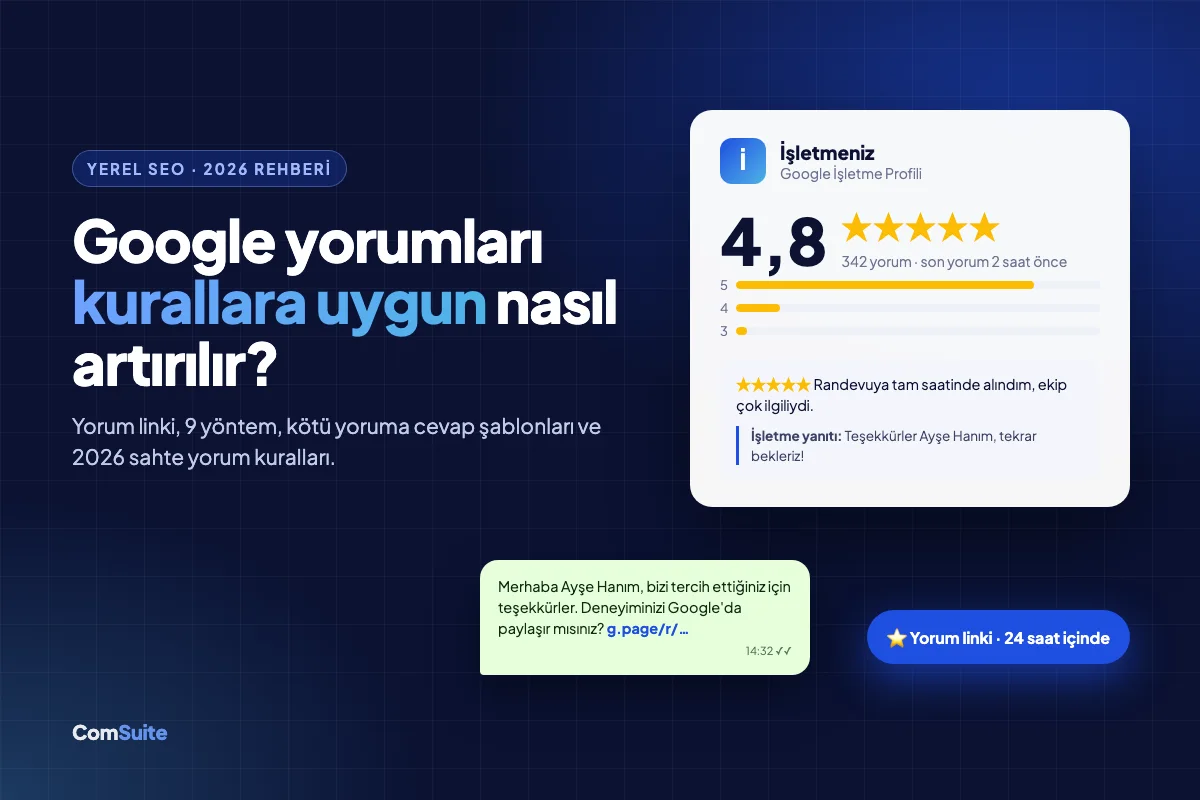
Short answer: The most effective way to get more Google reviews is to send every customer a short review link within 24 hours of the service and reply to every review you receive. As of 2026, offering discounts in exchange for reviews, sending the link only to satisfied customers, and setting review quotas for employees all clearly violate Google's policy, and the consequences can go as far as your profile being blocked from receiving new reviews.
Your business's Google rating now matters more than your storefront. Before a customer ever calls you, they see you on the map, check your stars, skim the last three reviews, and often make their decision without ever visiting your website. In this guide, we walk you step by step through how to grow your review count within the rules, how to turn negative reviews into opportunities, and what changed in 2026.
If you don't have a profile yet, start with our guide How to Set Up a Google Business Profile; this article focuses on the stage after your profile is live.
Why Do Google Reviews Matter So Much?
Reviews directly affect your business in three places: your ranking on the map, the moment a customer makes a decision, and the recommendations of AI assistants.
1. Local ranking (Google Maps and "near me" searches)
When Google ranks local results, it looks at three main factors: relevance, distance, and prominence. Review count, average rating, and how recent your reviews are are all part of the prominence signal. You can't change the distance, but you can change your review flow. If two dental clinics are on the same street and one gets 2 reviews a month while the other gets 20, the second one is usually the one that shows up higher on the map.
2. The customer's decision moment
A rating alone isn't enough; customers look at the following:
- Review count: A 4.9 rating with 7 reviews inspires less trust than a 4.6 rating with 340 reviews.
- Freshness: A business whose latest review is 8 months old raises the question, "Is it even still open?"
- Business responses: A calm, solution-oriented reply to a bad review is more convincing than five five-star reviews.
3. AI recommendations (GEO)
When ChatGPT, Gemini, and Google's AI Mode answer questions like "Can you recommend a good physical therapist in Izmir?", they draw on review content to describe businesses. The more your customers describe your service, your district, and their experience in their own words, the more likely AI is to recommend you for the right question. For more on this topic, take a look at our GEO guide.
An important distinction: telling a customer "use these words in your review" is prohibited (more details below). To get natural reviews, what you need to do is show customers not what to write, but how to write it easily.
What Changed in 2026? Two Critical Rules
This year, the rules on collecting reviews tightened both on Google's side and in Turkey. Some of the old tactics are no longer just "ineffective"; they are now a direct risk.
Google's April 2026 policy update
On April 16–17, 2026, Google updated its Maps review policy and added explicit prohibitions to the "Rating Manipulation" section. According to Google's own statement, more than 292 million policy-violating reviews were blocked or removed in 2025. As of today, the following practices are explicitly prohibited:
| Prohibited practice | What it looks like in practice |
|---|---|
| Incentivized reviews | "10% off for leaving a review," "enter a giveaway with your review," loyalty points |
| Selective review solicitation (review gating) | First asking "Were you satisfied?" and sending the Google link only to those who say "yes" |
| Review quotas for employees | "Everyone must bring in 10 reviews this week," bonuses tied to review counts |
| Content steering | "Mention Mr. Ahmet by name in your review," "use these words" |
| On-site pressure | Taking a customer's phone at the register and having them write a review, shared tablets/kiosks |
| Employee and close-contact reviews | Staff, relatives, or an agency writing reviews |
When a violation is detected, the penalties escalate: first, suspicious reviews are removed; then your profile may be temporarily blocked from receiving new reviews, and users may see a warning in search such as "fake reviews have been removed from this business." A single warning banner can wipe out in a day the reputation you've built up over a year.
Turkey: the fake review regulation that took effect on August 1, 2026
An amendment by the Ministry of Trade to the Regulation on Commercial Advertising and Unfair Commercial Practices (Official Gazette, July 1, 2026, issue 33297) took effect on August 1, 2026. The regulation is particularly relevant for e-commerce businesses that display reviews on their own sites:
- Only a consumer who has actually purchased a product or service can review it.
- Reviews cannot be deleted, hidden, or filtered simply because they are negative.
- Published reviews must remain accessible for at least one year.
- Reviews cannot be ordered in a way that steers consumers in a particular direction.
The Ministry announced that sellers who violate these rules will face administrative sanctions under Consumer Protection Law No. 6502, and that access bans have been imposed on sites that sell reviews or followers.
What does this mean? "Buying reviews" carries the risk of both a profile penalty on Google and an administrative fine in Turkey. If your site has a review module, check that the right to review is open only to customers who have placed an order and that negative reviews are published too. We recommend consulting a lawyer for a legal assessment; this article is for informational purposes only.
Step 1: Create Your Google Review Link
Every extra click a customer has to make to write a review lowers the likelihood that they will. That's why you need a short link that takes the customer straight to the review window.
- Search for your business name on Google, or sign in to your profile at business.google.com.
- In the profile management panel, click the "Ask for reviews" button.
- Your review link is ready in the window that opens: copy the short address that starts with g.page/r/....
- Test the link from your own phone, in a browser where you're signed out of your Google account; the star rating screen should open directly.
Tip: You can turn this link into a QR code and print it on both your business cards and your invoices/receipts. However, rather than holding the QR out to the customer and saying "scan it now," placing it on the bag, the box, or the bottom of the invoice is the cleanest way to avoid running afoul of the on-site pressure ban.
Step 2: 9 Compliant Ways to Collect Reviews
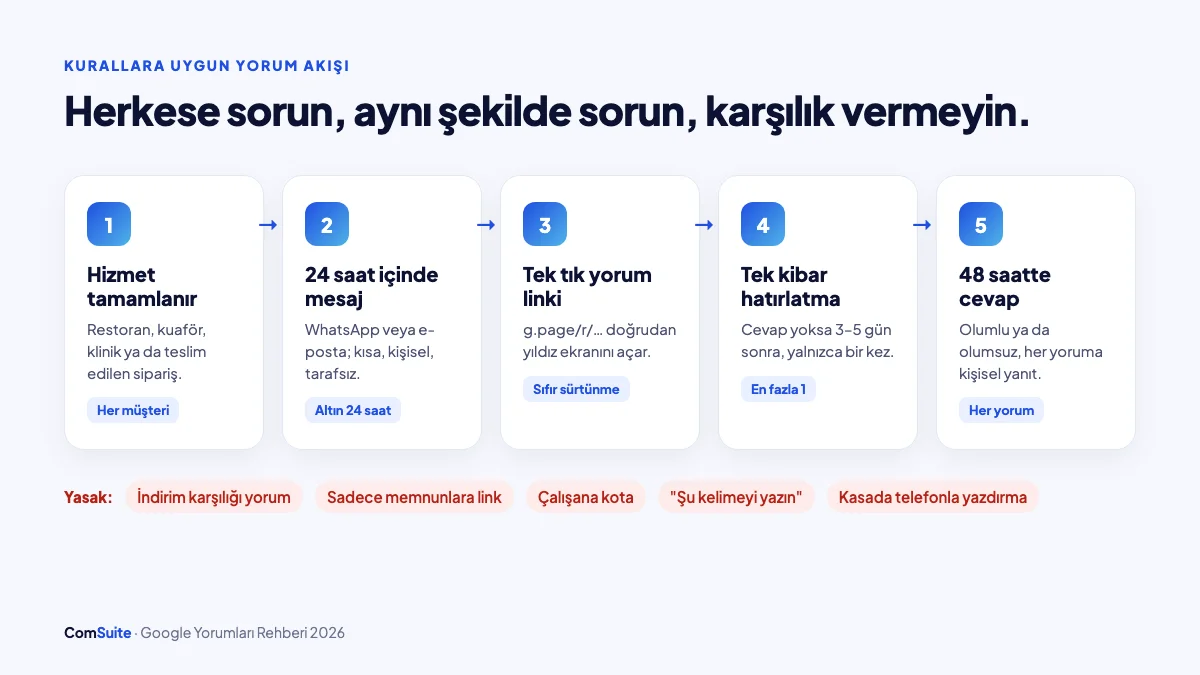
What these methods have in common: ask everyone, ask the same way, give nothing in return, and make it easy.
1. The golden 24-hour rule
The best time to ask for a review is when satisfaction is still fresh. For a restaurant, that's the same evening; for a hair salon, the next morning; for e-commerce, 2–3 days after delivery (give customers time to try the product); for a clinic, the day after a follow-up appointment. A request that arrives a week later usually goes unanswered.
2. A single WhatsApp message
In Turkey, WhatsApp is the channel with the highest response rate. A short, personal, neutral message is all you need:
Hello Ayşe, thank you for choosing us today. If you share your experience on Google, it helps us and the customers who come after you more than you know: [review link] — Our Team
Notice that the message doesn't mention "5 stars," "if you were satisfied," or any specific wording. Phrases like those are just a polite form of review gating.
3. Automated email after an order or appointment
If you use an e-commerce site or an online booking system, set up an automated email after delivery or the appointment. A single button ("Review us on Google") is enough. To keep these emails out of the spam folder, your domain's SPF/DKIM settings need to be configured correctly.
4. Invoice, receipt, and in-package card
A small card placed in the shipping box ("Your opinion matters to us" + a QR code) is especially effective in e-commerce. Customers write their review when they open the product, on their own time, with no pressure.
5. A review section and review showcase on your website
Add a "Review us on Google" button to your contact page and order confirmation page. Showing your real Google reviews on your site also builds trust. If you mark them up with schema markup, keep one thing in mind: Google does not show stars (rich results) in search for reviews a business displays about itself on its own site. The showcase still increases visitor trust.
6. Habits for your staff, not quotas
Setting a target like "20 reviews a month" for your staff is now off the table. Instead, standardize the process: the review link goes out automatically at the close of every transaction, and staff simply say, "We'll send you a short review link." No quotas, no bonuses, just one standard sentence.
7. A one-time campaign to your existing customer list
If you have customers you've served for years but never asked for a review, send a one-time message to your customer list from the past 6–12 months. Just don't send it to everyone on the same day; spread it out over several days. Google can automatically flag sudden bursts of reviews in a short period as suspicious.
8. The reminder: once, and politely
You can send a single reminder 3–5 days later to customers who didn't respond to the first message. Anything beyond the second message is a nuisance and harms both your customer relationship and your email reputation.
9. Micro details that make reviewing easier
- Always provide a shortened Google link; don't say "go to Google and search for us."
- Personalize messages with the customer's name.
- If you have older customers, point out that the link is as simple as "tap a star, write two sentences, and send."
- You can invite photo reviews ("you're welcome to add a photo"); this is not steering the content.
Asking for reviews: a table of right and wrong wording
| Right (compliant) | Wrong (risk of policy violation) |
|---|---|
| "Would you share your experience on Google?" | "If you were satisfied, would you give us 5 stars?" |
| "Your feedback is valuable to us." | "10% off your next purchase when you write a review." |
| The same message to all customers | A survey first, then the Google link only for satisfied customers |
| "You're welcome to add a photo." | "Could you mention Dr. Can by name in your review?" |
| A QR code on the receipt or package | Having customers write a review on their phone at the checkout counter |
Step 3: Reply to Every Review (Especially the Bad Ones)
Replying to reviews tells both your customers and Google, "This business is active and cares." Your goal: reply to every review within 48 hours.
Replying to positive reviews
Copy-paste "Thank you 🙏" replies don't work. A good reply is short, personal, and picks up on a detail from the review:
Hi Mehmet, we were so happy to hear that the solid oak dining table suits your new home. We've passed your thanks on to our installation team as well. Enjoy many wonderful meals together!
Because this reply naturally repeats your service and your city, it gives extra context to both the customer reading it and to AI. But don't overdo it: stuffing keywords into every reply looks artificial.
Replying to negative reviews: a 4-step framework
A bad review is a chance to show the next 100 customers who read it how you treat people. Write your reply not just for the reviewer, but for everyone who will read it.
- Thank and acknowledge: Show that you take the experience seriously before getting defensive.
- Take responsibility: If the mistake was yours, say so plainly; if not, clarify the situation without blaming anyone.
- Move the resolution offline: Give a phone number or email; don't hash out the details in the review thread.
- Keep it short: 3–5 sentences is enough. Long defenses read like arguments, not apologies.
Template 1 – If the mistake was yours:
Hi Zeynep, we're truly sorry for the delay you experienced; we should have kept to your appointment time. We've reorganized our appointment scheduling this week. We'd like to make it right; you can reach me directly at 0XXX XXX XX XX. — Clinic Manager
Template 2 – If there's been a misunderstanding:
Hi Burak, thank you for your feedback. We looked into the shipping issue, and your order was held at the carrier for two days. We've raised this with them. We're sorry you were kept waiting; if you write to us at destek@... we'd be happy to go over the details.
Never do this: Share a customer's personal information (health status, order details, address) in your reply. This risks violating Turkey's data protection law (KVKK), and in healthcare it also breaches patient privacy. Accusatory replies like "They showed up late themselves" make you look in the wrong even when you're right.
How to get fake or unfair reviews removed
Google won't remove a review just because you don't like it, but it will if the review violates its policies. Reviews that can be removed include:
- Reviews written by someone who was never your customer (a competitor, a former employee, spam)
- Insults, hate speech, threats, or obscene content
- Reviews that clearly belong to a different business
- Off-topic content (political commentary, complaints unrelated to your business)
- Reviews containing personal information (phone number, address)
The removal process:
- Go to the review in Google Maps, click the three dots, choose "Report review", and select the appropriate violation type.
- Track the status of your report in the review management tool in your Business Profile dashboard.
- If it's rejected, you can appeal once through the same tool; explain briefly and with evidence why the review is a violation (e.g., "We have no customer record under this name, and the review appeared on our competitor's opening day").
- The process can take anywhere from a few days to a few weeks. In the meantime, write a calm, professional reply to the review; readers will understand the situation.
In cases involving blackmail ("Pay us or we'll flood you with bad reviews"), use Google's fraud reporting form and get legal support if necessary.
The 6 Most Common Mistakes
- Buying reviews. It raises your rating in the short term, but the reviews get deleted in the medium term; it risks a profile warning and, in Turkey, administrative penalties.
- Collecting all your reviews in one day. 40 reviews on opening day followed by months of silence looks both suspicious and ineffective. Aim for a steady flow.
- Sending the link only to happy customers. This is the most common and least noticed violation.
- Leaving reviews unanswered. An unanswered one-star review in particular tells customers, "They don't care."
- Writing only to the reviewer and forgetting the reader. The real audience for your reply is the next potential customer.
- Entering your business name and category incorrectly. If reviews don't land on the right profile, your effort is wasted; check your profile details regularly.
30-Day Action Plan
| Week | To do |
|---|---|
| Week 1 | Create your review link, prepare a QR code, write WhatsApp and email message templates, and reply to all existing reviews |
| Week 2 | Start automatic review requests after every transaction; print cards for packages and receipts |
| Week 3 | Send the campaign to your customer list from the past 6 months, spread over several days; schedule a single reminder |
| Week 4 | Measure results: number of new reviews, average rating, response time; report fake reviews |
Most small businesses that follow this plan see a noticeable increase in reviews in the first month; the real payoff comes once the process becomes a habit.
Frequently Asked Questions
Is it illegal to buy Google reviews?
Yes. Google's policy explicitly prohibits fake and incentivized reviews. If they are detected, the reviews are removed, your profile may be blocked from receiving new reviews, and a warning may be shown to users. In Turkey, as of August 1, 2026, fake reviews are subject to administrative penalties.
Can I offer a discount in exchange for a review?
No. Whether the review is positive or negative, any discount, gift, raffle entry, or points offered in exchange for a review counts as an incentive and is prohibited.
Can I delete a bad review?
Business owners cannot delete reviews themselves. If a review violates Google's policy (fake, abusive, off-topic), you can report it and request its removal. A removal request will not be accepted just because a review is negative.
Where do I get my Google review link?
When you click the "Ask for reviews" button in your Google Business Profile dashboard, a short link starting with g.page/r/ is generated automatically.
Why are my reviews not showing up or why did they disappear?
Google may hold back reviews it finds suspicious before publishing them, or remove them afterward. The most common causes are a large number of reviews arriving in a short time, reviews coming from the same network, or a policy violation. Spread your review requests out over time.
Do reviews affect AI search?
Yes. ChatGPT, Gemini, and Google AI Mode draw on the experiences described in reviews when recommending businesses. The more genuine, detailed reviews you have, the more likely you are to be recommended for the right query.
Put Your Reputation on Autopilot
Collecting reviews is not a one-time campaign; it's a process that runs every day. With ComSuite:
- Replio AI brings your customer communication and review monitoring together in a single dashboard,
- the CRM module keeps your customer and transaction records in one place, so the list of people to ask for reviews is always ready,
- SEO GEO Autopilot continuously measures your brand's visibility in Google and AI search.
Is your brand being recommended in ChatGPT before your competitors? Take the free visibility test and find out in 2 minutes.
Sources
- Google's 2026 review policy update and enforced prohibitions (Launchcodex)
- Google's profile restrictions for fake/incentivized reviews (DAC Group)
- Ministry of Trade statement on fake reviews (Dünya)
- Access ban on fake reviews in online shopping (NTV)
- Details of the new review rules (Teknoblog)